Great products and friendly service get customers through the door. What keeps them coming back — and keeps your business running — is what happens behind the scenes: a checkout that never freezes, a Wi-Fi connection that never drops, and cameras that are actually recording when something goes wrong.
For Los Angeles retailers, that behind-the-scenes reliability is under more pressure than ever. Organized retail crime has been climbing for years, and the numbers back it up: the National Retail Federation’s 2025 Impact of Retail Theft & Violence study found that retailers reported an 18% increase in the average number of shoplifting incidents per year in 2024 versus 2023, with threats or acts of violence during theft events rising 17% over the same period. At the same time, customers expect instant mobile checkout, fast guest Wi-Fi, and zero patience for a slow point-of-sale terminal.
The two problems — security and connectivity — are usually handled as separate projects. That’s a mistake. Every camera, access point, and payment terminal in your store runs on the same physical network. If that network is undersized, poorly cabled, or an afterthought, it doesn’t matter how good the camera or POS system is — performance suffers everywhere at once.
At DIGICO, we design and install both sides of that equation for Los Angeles retailers: structured network cabling, business-grade commercial networking, and integrated security camera systems, delivering reliable infrastructure as one plan instead of three separate vendors. Here’s how the pieces fit together, and what to look for when you’re building or upgrading your store’s infrastructure.
Why Security and Networking Are One Project, Not Two
Retail technology has quietly become one interconnected system. IP cameras, wireless access points, digital displays, and payment terminals all share the same cabling, the same switches, and often the same internet connection. Plan them together, and every system performs better and costs less to expand later. Plan them separately, and you end up paying twice — once for the initial install, and again when someone has to rip open a wall to fix a cabling shortfall.
Security protects more than the merchandise
Loss prevention is the obvious reason retailers install cameras, but a well-designed system earns its keep in several other ways:
- Theft deterrence. Visible cameras at entrances, checkout counters, and high-value displays discourage opportunistic theft and give staff a head start on spotting suspicious behavior.
- Employee safety. Coverage of stockrooms, receiving docks, and parking areas gives managers visibility during opening, closing, and late-night shifts – and an objective record if a dispute occurs.
- Liability protection. Slip-and-fall claims, refund disputes, and fraud allegations are far easier to resolve with clear footage on hand.
- Incident documentation. Video evidence supports insurance claims, assists law enforcement, and helps identify operational gaps before they become recurring problems.
A shaky network affects everything, not just Wi-Fi
Every one of these systems depends on connectivity that doesn’t quit:
- POS terminals need a stable connection for every transaction — a dropped connection at 6pm on a Saturday means a line out the door.
- Cloud inventory platforms rely on real-time sync to keep stock counts accurate across locations.
- Scheduling, accounting, and CRM tools increasingly live in the cloud, so an outage doesn’t just slow things down — it locks staff out of the tools they need to do their jobs.
- Digital signage needs consistent bandwidth to display promotions without lag or dropouts.
- Guest Wi-Fi has to be fast enough to satisfy customers without ever touching the same network as your POS or camera systems.
When cameras, POS, Wi-Fi, and cloud applications are planned as one infrastructure, retailers get better performance, simpler troubleshooting, and a much easier path to adding new technology down the road.
The Building Blocks of Reliable Network Cabling and Commercial Networking
A network isn’t just “the internet connection.” It’s a stack of components that all need to work together — and a weak link anywhere in that stack shows up as lag, dropped calls, or a camera feed that freezes at the worst possible moment.
Structured Network Cabling for Commercial Networking
Wireless gets the attention, but structured cabling is still the backbone of every commercial network. Cat6 handles Gigabit and even 10-Gigabit speeds over shorter runs and is more than adequate for most retail spaces. Cat6A is worth the upgrade for larger stores or longer cable runs, since it reduces interference and supports higher bandwidth over distance.
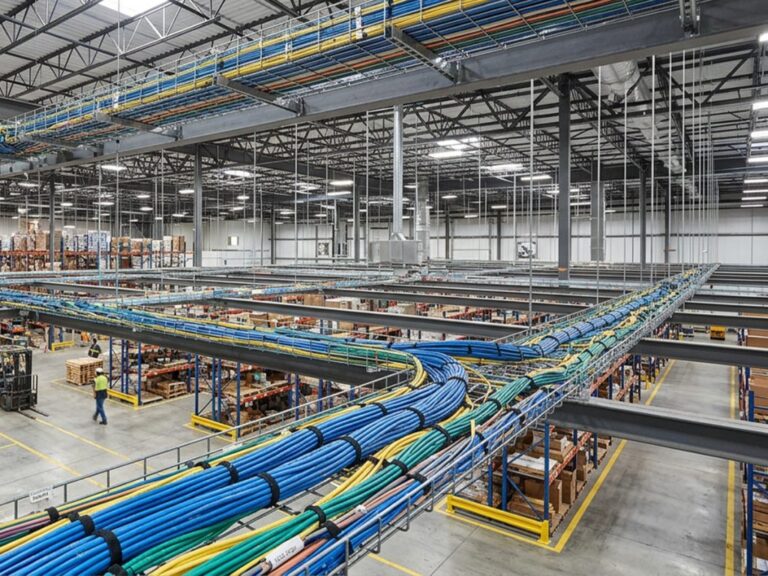
Just as important as the cable itself is how it’s installed. Organized routing, labeled patch panels, and properly built racks aren’t cosmetic details — they’re what determines how quickly a technician can diagnose a problem six months or six years from now, instead of tracing wires through the ceiling. Properly planned data wiring and installation provides the foundation for reliable POS systems, Wi-Fi, IP cameras, and other connected business technologies.
Business-grade switches and PoE
Switches are the traffic controllers of your network, and consumer-grade hardware simply isn’t built for continuous, high-volume commercial use. Power over Ethernet (PoE) switches are particularly valuable in retail because they deliver data and power over a single cable — which is how most IP cameras, access points, VoIP phones, access control readers, and digital displays get both connected and powered without a separate outlet at every device.
Managed switches also give your IT team (or your managed services provider) visibility into what’s happening on the network — which devices are connected, where traffic is congested, and where a problem is starting to form before it becomes an outage.
Secure business Wi-Fi
A retail Wi-Fi network has two audiences with very different needs: staff running POS and inventory tools, and customers who just want a fast connection for their phone. Proper access point placement eliminates dead zones across the sales floor, stockroom, and office areas, but the real safeguard is network segmentation — keeping guest traffic on a separate network from anything business-critical. Customers get fast Wi-Fi; your POS terminals and cameras never have to compete for bandwidth or sit exposed on the same network as public devices.
Internet redundancy
Card processing, cloud inventory, and security monitoring all assume the internet is always on. It isn’t. A secondary connection — a backup fiber line, cable failover, fixed wireless, or 5G cellular backup – automatically takes over if the primary ISP goes down, so a service outage doesn’t turn into a lost afternoon of sales. Businesses planning high-bandwidth or multi-location connectivity can also benefit from fiber optic cabling and installation to support long-term network performance and scalability.
Bandwidth planning is just as important as redundancy. Retail stores using a local NVR typically don’t send camera footage over the internet during normal operation, while cloud-based security camera systems require additional upload capacity — roughly 2-4 Mbps per camera — to maintain reliable recording quality.
Firewalls and everyday cybersecurity habits
Retailers are attractive cybercrime targets because they process payment data and hold customer information. A business-grade firewall is the first line of defense, but it works best alongside a handful of habits that cost little and prevent a lot:
- Keep firmware updated on switches, access points, and firewalls
- Require strong passwords and multi-factor authentication
- Keep payment systems on a separate segment from guest Wi-Fi
- Monitor connected devices for unusual activity
- Back up critical data to a secure, separate location
The Cybersecurity and Infrastructure Security Agency (CISA) publishes free guidance specifically aimed at small and mid-sized businesses, and the NIST Cybersecurity Framework (CSF) 2.0 lays out a widely adopted, six-part approach — govern, identify, protect, detect, respond, and recover — that scales down just as well to a single storefront as it does to a national chain. Neither requires an enterprise IT budget to put into practice; they’re a genuinely useful starting checklist.
California retailers should also pay close attention to privacy regulations when deploying security cameras. Cameras with built-in microphones may be subject to California’s all-party consent law (Penal Code § 632), meaning audio recording generally requires the consent of all parties involved. If you’re using AI-enabled security camera systems with people-counting or other analytics, it’s also important to evaluate your obligations under the California Consumer Privacy Act (CCPA) and the California Privacy Rights Act (CPRA), particularly if personal or biometric information could be collected.
Designing Security Camera Systems That Actually Work
A camera is only as useful as its placement, its image quality, and the network carrying its footage. Here’s where the details matter most.
Where cameras earn their keep
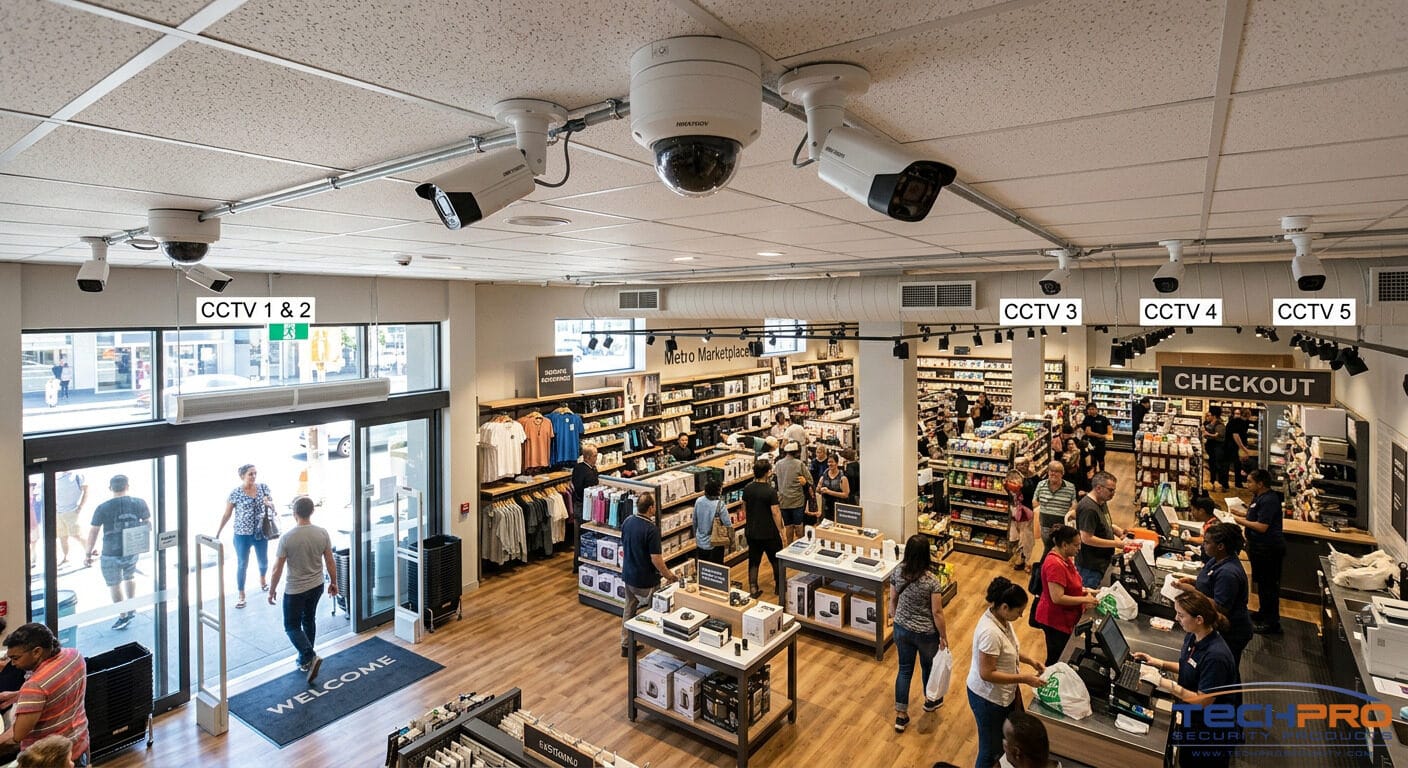
- Entrances and exits — every person who enters or leaves the store passes through here, so this is priority one for clear facial capture and deterrence.
- Checkout counters — high-resolution coverage helps investigate refund fraud, cash discrepancies, and disputed transactions, especially when footage is tied to POS data.
- Sales floor — overlapping wide-angle views reduce blind spots across aisles and high-value displays.
- Stockrooms and employee areas — inventory losses don’t only happen out front; receiving docks and back-of-house spaces deserve coverage too.
- Parking lots and perimeters — weather-resistant cameras with infrared night vision extend protection past the front door and help everyone feel safer walking to their car after close.
Matching the camera to the job
- Dome cameras are the standard for indoor retail — discreet, and hard to tell which direction they’re pointed.
- Bullet cameras are built for longer sightlines and visible deterrence, which is exactly what you want in a parking lot or loading dock.
- PTZ (pan-tilt-zoom) cameras let an operator actively track activity across a large floor or shopping center in real time.
- AI-enabled cameras now go beyond recording — flagging unusual motion, distinguishing people from environmental changes, and offering people-counting or occupancy analytics that double as useful business intelligence, not just security data.
Where the footage lives
- NVR (local storage) keeps recording quality high and doesn’t depend on internet bandwidth for playback.
- Cloud storage keeps footage safe even if on-site equipment is stolen or damaged, and it’s accessible from anywhere.
- Hybrid storage — the choice most retailers land on — combines local speed with off-site backup for genuine disaster recovery.
Cameras that talk to your other systems
The real payoff comes from integration. Linking cameras to your POS system means a manager can search footage by transaction instead of scrubbing through hours of video. Tying cameras into intrusion alarms means a triggered alarm after hours can automatically bump recording to a higher frame rate or push a live alert to your phone. None of this works without a network that can carry the load — which is exactly why camera design and network design have to happen together, not as separate contracts with separate installers. If you’re planning a new installation or upgrading an existing system, learn more about our surveillance camera wiring and installation services.
Why Professional Network Cabling Is the Investment Retailers Underestimate
It’s easy to spend on cameras, switches, and a modern POS system and treat the cabling behind the walls as an afterthought. That’s a costly mistake, because every device on your network shares that same physical foundation.
Poorly installed cable doesn’t always cause problems on day one – it shows up later as slow transfer speeds, intermittent camera outages, and troubleshooting calls that take hours instead of minutes. Professional installation following the ANSI/TIA-568 structured cabling standard and verified with proper cable certification testing avoids that entirely, and it leaves room in the patch panel and cable runs for whatever your business adds next — self-checkout kiosks, more cameras, additional access points — without an expensive rewire.
The payoff shows up in day-to-day operations: faster, more consistent POS transactions, cameras that stream clear footage without dropped frames, and a network that a technician can actually troubleshoot quickly because everything is labeled, organized, and documented. Learn more about our low voltage wiring and cabling services for retail stores, offices, and commercial properties.
Because Southern California is a seismic region, properly securing equipment racks, cabinets, and mounted hardware is also an important part of a professionally designed commercial installation.
Commercial Networking Practices Worth Building Into Your Store
- VLAN segmentation keeps POS terminals, cameras, office computers, and guest Wi-Fi logically separated even though they share the same physical infrastructure — so a problem on one segment doesn’t spill into another.
- A dedicated, secure payment network — with encrypted communication and access controls — keeps card data traffic isolated, which supports compliance with the PCI Data Security Standard (PCI DSS) that governs how retailers must handle cardholder data.
- Separate guest Wi-Fi protects customer experience and business systems at the same time, since customer devices never touch POS, camera, or inventory traffic.
- Remote monitoring catches a failing switch or an overloaded access point before staff even notice a slowdown.
- Scalable infrastructure — extra switch ports, extra cable capacity, room to grow — means the next expansion doesn’t require replacing what you already built.
Mistakes We See Most Often in Los Angeles Retail Stores
After years of walking into stores after something has already gone wrong, the same handful of shortcuts show up again and again:
- Residential Wi-Fi routers asked to do a commercial job they were never built for.
- Cameras mounted for convenience, not coverage — pointed into glare, placed too high, or leaving the checkout counter as a blind spot.
- Bargain switches that can’t supply enough PoE for the cameras and access points added later.
- Cabling treated as an afterthought, which is expensive to fix once it’s behind a finished wall.
- No UPS backup, so a brief power blip takes down switches, cameras, and internet gear all at once.
- Weak passwords and outdated firmware left unaddressed because “we’ll get to it.”
- No documentation of cable routes, IP addresses, or switch configurations, which turns a routine fix into a multi-hour investigation.
Every one of these is preventable with planning up front — and every one is more expensive to fix after the fact than it would have been to do right the first time.
What to Look for in a Retail Security & Networking Partner
Not every low-voltage contractor understands retail. When you’re evaluating a provider in Los Angeles, a few things matter more than price alone:
- Proper licensing and insurance for low-voltage work in California. Contractors installing commercial low-voltage systems should hold the California Contractors State License Board (CSLB) C-7 Low Voltage Systems license and understand local permitting and inspection requirements.
For projects in Los Angeles, experience with Los Angeles Department of Building and Safety (LADBS) permitting requirements and commercial building codes can help prevent unnecessary delays during installation.
- Retail-specific experience — ask to see past projects or talk to a reference from a similar business.
- Real structured cabling expertise, since cabling is the one part of the job that’s hidden behind the walls once it’s done.
- Working knowledge of commercial networking — VLANs, PoE planning, wireless design, segmentation, firewalls — not just “we can run some cable.”
- A local presence, so a service call doesn’t mean waiting days for someone to show up.
- Ongoing support after installation — firmware updates, health checks, and a real answer when you ask “what happens if something breaks in six months?”
- A clear warranty on both equipment and labor.
The Case for Doing It All at Once
Coordinating separate vendors for cameras, Wi-Fi, and cabling almost always costs more in the end — more site visits, more redundant cable runs, more finger-pointing when something doesn’t work. An integrated installation avoids that, and the benefits compound:
- Lower labor costs, since everything is planned and pulled in the same visit instead of three.
- Cleaner infrastructure, because routes and rack layouts are optimized before walls close, not patched in afterward.
- Easier long-term maintenance, thanks to consistent labeling and documentation across the whole system.
- Better overall performance, since bandwidth and hardware are planned around every system at once instead of guessed at separately.
- Faster deployment, which matters if you’re working against a construction or opening timeline.
- One point of contact when something needs attention, instead of three different companies pointing at each other.
This approach scales down to a single boutique and up to a multi-location franchise or shopping center just as easily — the principle doesn’t change, only the size of the project.
Building the Foundation Before You Need It
Cameras get the attention, but they’re only as good as the network cabling carrying their footage. Professional network cabling, well-planned commercial networking, and integrated security camera systems work together — not as separate line items, but as one foundation your business relies on every day.
If you’re opening a new Los Angeles location, remodeling, or simply tired of patching an outdated setup, contact DIGICO to schedule a site assessment. We’ll walk your space, talk through how you actually operate, and put together a plan that covers cabling, networking, security cameras, and ongoing managed support — built for your store, not a generic template.
FAQ
Do I really need to plan security camera systems and network cabling together?
You can technically install them separately, but it usually costs more in the long run. Security camera systems depend on the same network cabling, switches, and bandwidth as your POS and Wi-Fi. Planning both at once means the cabling and power capacity are sized correctly from day one, instead of discovering a shortfall after the cameras are already mounted.
What internet speed does a small retail store actually need?
It depends on your camera count, POS setup, and whether your security cameras record locally or to the cloud. For many single-location retail stores with 8-12 security cameras, business-grade 300-500 Mbps symmetrical fiber is sufficient for POS systems, guest Wi-Fi, and everyday operations when using a local NVR, since camera traffic stays on the local network. If your cameras record directly to the cloud, plan for approximately 2-4 Mbps of upload bandwidth per camera, in addition to your normal business traffic. A professional site assessment can confirm the right capacity based on your store’s layout and future growth.
Is cloud storage or local (NVR) storage better for security footage?
Neither is universally “better” — it depends on your budget, internet reliability, and how long you need to retain footage. Many Los Angeles retailers land on a hybrid approach: local storage for fast playback, cloud backup in case equipment is damaged or stolen.
How often should network cabling be replaced?
Properly installed network cabling (Cat6 or Cat6A…) can last well over a decade . Most retailers don’t need to replace cabling — they need to add capacity as new devices come online, which is exactly what a scalable installation is designed to support.