Modern medical offices depend on technology far more than most people notice from the waiting room. Behind every smooth appointment check-in, seamless EHR lookup, and monitored entry door lies a network of low-voltage systems designed to keep the facility running without interruption. When that infrastructure is well-built, no one thinks about it. When it’s not, everyone feels it immediately.
With more than 17 years of experience delivering data wiring, cabling, and surveillance solutions across Los Angeles, DIGICO has seen what separates practices that scale easily from those that struggle as soon as they add a new provider or upgrade their scheduling platform. The answer is almost always the quality of the decisions made before the first cable was ever pulled.
This guide covers everything a medical office should understand about low-voltage infrastructure: which systems matter, how to plan them properly, what typically goes wrong, and what to look for in a contractor.
Why Low Voltage Infrastructure Matters More in Healthcare Than Other Commercial Spaces
Healthcare environments tolerate far less disruption than a typical law firm or retail space. When the network goes down in a coffee shop, customers are mildly annoyed. When it goes down in a busy medical practice, appointment coordination stalls, patient intake slows, connected devices may lose access to records, and staff are left managing everything manually at exactly the moment they cannot afford to.
This raises the stakes for everything that goes into building a medical office network – not just the router and a few wall jacks, but the full ecosystem of structured cabling, communication systems, physical security, and wireless infrastructure that ties the practice together.
Reliable medical office communication systems affect more than convenience. They influence how quickly a front-desk team can pull records, how efficiently providers coordinate between exam rooms, and how confidently a practice can add new staff or locations without rebuilding its infrastructure from scratch.
Core Low Voltage Systems Every Medical Office Needs
Structured Data Cabling: The Foundation Everything Else Depends On
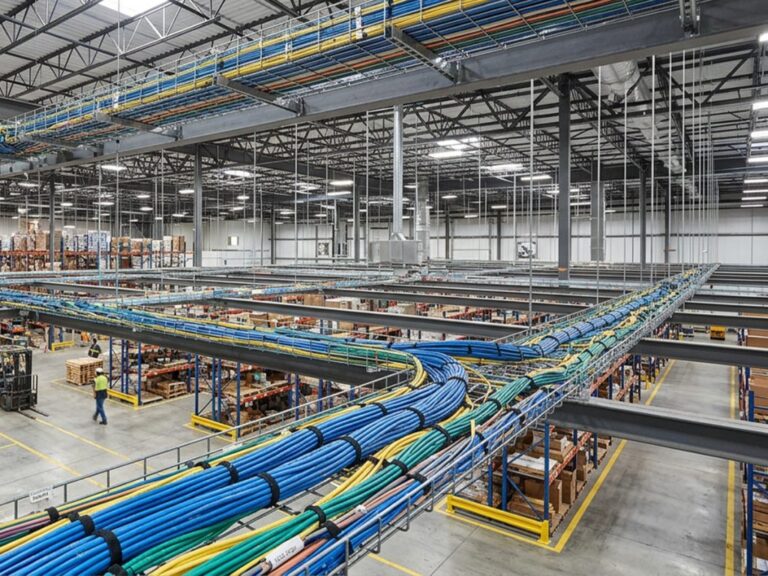
Structured data cabling is the physical layer that carries internet traffic, phone service, surveillance feeds, wireless access points, and increasingly, power for connected devices through Power over Ethernet (PoE). Every other system in a medical office depends on it functioning correctly under load.
For most medical office environments, the practical choice today is between Cat6 and Cat6A. The distinction matters more than many people realize.
Cat6 is rated under ANSI/TIA-568 for performance up to 250 MHz and can support 10-Gigabit Ethernet, but only at cable runs up to approximately 55 meters. For runs of 100 meters – the standard channel length in most commercial buildings – Cat6 reliably supports 1 Gbps. That may be more than sufficient for a small single-provider practice today, but it’s worth factoring in growth.
Cat6A (augmented Category 6) doubles the bandwidth ceiling to 500 MHz and supports full 10-Gigabit speeds at the standard 100-meter channel length. It also handles PoE++ (IEEE 802.3bt), which delivers up to 90 watts per port – enough to power high-resolution IP cameras, Wi-Fi 6 access points, and smart building sensors without running separate power lines. Given that the installed cost difference is typically $10-25 per drop, Cat6A is increasingly the default recommendation for any new medical office construction or major renovation.
A well-organized server room ties everything together. Proper rack layout, labeled patch panels, adequate cable management, and thoughtful airflow don’t just look clean – they reduce troubleshooting time significantly and make future upgrades far less disruptive. Practices planning new construction or infrastructure upgrades benefit most from engaging experienced structured cabling installation professionals before decisions are finalized, not after.
Medical Office Communication Systems: Beyond the Office Phone
The traditional office phone system has largely been replaced by Voice over IP (VoIP) platforms that run entirely over the data network. This is an improvement in most respects: VoIP is cheaper to operate, easier to reconfigure when staff changes occur, and simpler to expand across multiple suites or locations. It does, however, mean the data network now carries one more mission-critical function – which reinforces the importance of building that network correctly from the start.
Reliable medical office communication systems today typically include VoIP phones, internal messaging platforms for staff coordination, video conferencing for remote consultations and team meetings, and integrations with scheduling and EHR platforms. The real value comes when these tools work together rather than operating as isolated systems. When a provider can pull up a patient’s appointment status while simultaneously communicating with the front desk over an internal platform, the number of steps in a routine workflow drops noticeably.
The infrastructure implications are straightforward: unified communication platforms require stable, low-latency network performance. They amplify the consequences of poor cabling or inadequate bandwidth just as much as they amplify productivity when the network is solid.
Security Cameras and Access Control: Physical Safeguards with Compliance Implications
Medical practices are required to implement physical safeguards under the HIPAA Security Rule, which establishes national standards for protecting electronic protected health information (ePHI). The rule’s physical safeguard requirements – codified under 45 CFR §164.310 – include facility access controls such as locked doors, key card systems, biometric controls, access logs, and workstation security policies.
In December 2024, HHS proposed updates to the HIPAA Security Rule specifically to strengthen cybersecurity protections for ePHI, a signal that regulatory expectations for healthcare environments will only continue to grow. Physical access control – knowing who can enter which area and when – is directly connected to these broader compliance obligations.
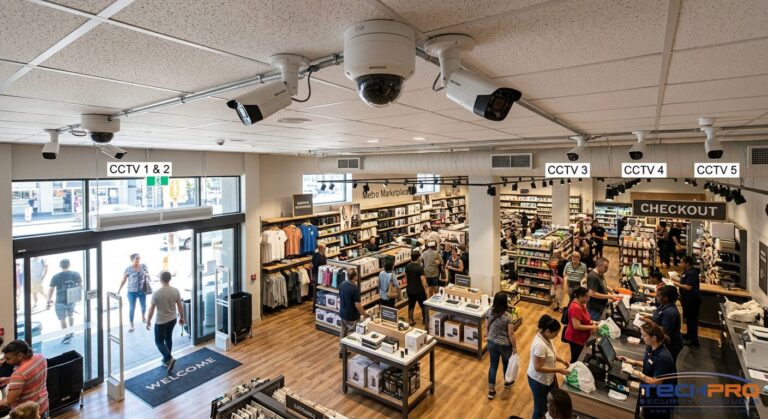
From an infrastructure standpoint, surveillance cameras, credential-based entry systems, and remote monitoring tools all run over the low-voltage network. When designed as part of the overall cabling plan rather than added later, these systems are easier to manage, more reliable, and significantly simpler to expand. An IP camera mounted with a dedicated Cat6A run is more dependable and easier to troubleshoot than one daisy-chained through an overloaded network switch as an afterthought.
Physical security in a medical office also has a practical operational layer that exists separate from compliance: it protects expensive equipment, controls access to medication storage areas, reduces liability, and gives staff confidence that the facility is managed professionally.
Fiber Optic Infrastructure: Planning for Capacity Before You Need It
For most small to midsize medical practices, Cat6A copper cabling provides more than adequate bandwidth for current operations. Fiber optic infrastructure becomes relevant in a few specific scenarios: larger practices handling significant simultaneous network traffic across dozens of connected devices, multi-suite or multi-floor facilities where cable runs exceed copper’s practical limits, and environments with extensive surveillance systems generating continuous high-definition video streams.
Even when full fiber deployment isn’t immediately necessary, the planning decision matters. Running conduit pathways during initial construction that could accommodate fiber later – without requiring walls to be opened again – costs very little upfront and can save substantially when upgrade time comes. The same principle applies to leaving slack in server room layouts and avoiding cable tray configurations that would become bottlenecks as new devices are added.
How to Plan Low Voltage Wiring for a Medical Office
Start with a Site Assessment That Looks Past the Floor Plan
A floor plan shows room dimensions. A useful site assessment for low-voltage planning goes considerably further: it maps how staff actually move through the space, where patient interaction points are, which areas require restricted access, where wireless coverage needs to be strongest, and what the realistic device count will be at full capacity – not just at opening day.
Two practices that occupy identical square footage can have entirely different infrastructure requirements depending on how many providers work simultaneously, whether they use mobile workstations or fixed desktop stations, whether there’s on-site imaging equipment, and how aggressively they’re growing. An experienced low voltage wiring contractor approaches network design as an operational question, not a construction task.
Equipment Placement Is Not an Afterthought
Where network equipment goes determines how the system performs, how easy it is to service, and how much it costs to expand later. A wireless access point installed in the center of a large open waiting area will perform better than one tucked in a corner to make the cable run shorter. A server room rack positioned near an exterior wall may create airflow challenges that wouldn’t exist with a different layout.
Thoughtful cable routing means running cables through organized pathways that can accommodate additional runs without requiring rework. It means maintaining separation between data cabling and electrical systems to minimize interference. It means installing more drops than are currently needed in areas likely to see new equipment. These decisions are easier to make before drywall goes up and much more expensive to correct afterward.
Documentation That Makes Future Work Possible
Clear cable labeling, network mapping, and equipment documentation are often treated as secondary concerns. They become primary concerns the first time a contractor who didn’t do the original installation needs to troubleshoot a problem at 7 AM before patient hours start.
Practices with organized infrastructure documentation can resolve issues faster, onboard new service providers more easily, and approach equipment upgrades with accurate information rather than guesswork. For medical offices that work with multiple vendors – an IT company, a phone service provider, a security monitoring company – common documentation standards are what allow those parties to work alongside each other without creating new problems.
Plan for Growth From the Beginning
Medical offices rarely stay the same size. Practices add providers, expand into adjacent suites, introduce new diagnostic equipment, and adopt updated communication platforms on a timeline that’s hard to predict at the start. Infrastructure built without capacity for that growth forces practices to choose between a disruptive, expensive rework or operating on an undersized network that limits what they can do.
Planning for growth doesn’t mean installing everything possible upfront. It means making decisions – extra conduit runs, scalable rack space, cable trays with room to grow, additional drops in treatment areas – that make future expansion straightforward rather than complicated.
Common Challenges in Medical Office Wiring Projects
Operating During Construction
One of the most consistent challenges in medical environments is that the practice usually cannot stop seeing patients while infrastructure work is happening. This makes phasing critical. Upgrades that would be simple in a vacant space require careful sequencing to maintain front-desk connectivity, keep exam room systems running, and avoid disrupting communication tools that staff depend on throughout the day.
Projects move more smoothly when phasing is planned before installation begins – not improvised as the work progresses. This requires a contractor willing to coordinate around the practice’s schedule rather than the other way around.
Integrating New Infrastructure with Legacy Systems
Very few medical offices start from a blank slate. Most expansion and upgrade projects involve an existing combination of older cabling, legacy phone equipment, surveillance devices installed in previous years, and newer cloud-based platforms that were added incrementally. Replacing everything at once is rarely practical or necessary.
The approach that works is identifying which existing systems can be retained reliably, which need replacement, and how new infrastructure can be introduced without creating compatibility gaps or hidden performance problems. This requires judgment, not just installation skill.
Performance Issues That Don’t Announce Themselves Clearly
Network performance problems in medical offices often don’t present as obvious failures. Instead, they appear as intermittent slowdowns, occasional dropped VoIP calls, or surveillance feeds that lag during peak usage. The root cause is frequently infrastructure – cable runs that slightly exceed spec, overcrowded patch panels, poor separation between systems, or a network designed for an earlier device count that was never updated as equipment was added.
Consistent performance comes from building the network to handle anticipated load comfortably, not just technically supporting current devices. The margin matters.
Cable Management as an Ongoing Operational Decision
Disorganized cabling is one of those problems that compounds over time. What starts as a mildly messy server closet becomes a troubleshooting challenge and an airflow problem as more equipment is added. Relabeling drops, organizing rack layouts, and properly bundling cables are maintenance tasks that improve serviceability without requiring major hardware investment – and that prevent small inefficiencies from becoming expensive ones.
How to Choose the Right Low Voltage Wiring Contractor
Look for Healthcare-Specific Experience
Working in a medical office requires more than technical competence. It requires understanding that systems need to stay operational, that patient privacy creates physical security obligations, and that decisions made during installation affect how a practice operates for years. A contractor with healthcare experience has likely already worked through the scenarios – limited downtime windows, sensitive access areas, phased installation schedules – that would slow down someone encountering them for the first time.
Ask for examples of similar projects. Ask how they’ve handled installations in active practices. The answers reveal how they think about their work.
Verify Licensing, Standards Compliance, and Documentation Practices
Quality infrastructure should be supported by quality documentation. Appropriate licensing, installation practices aligned with ANSI/TIA-568 standards, and organized project records – cable labels, network maps, equipment inventories – are what separate contractors who deliver long-term value from those who complete the installation and move on.
Documentation matters most after the project is finished: during future upgrades, when troubleshooting problems, when a different service provider needs to pick up where the last one left off.
Ask About Scalability, Not Just Capacity
There’s a difference between a contractor who asks “how many drops do you need?” and one who asks “how do you expect to use this space in three years?” The first question answers today’s needs. The second shapes an infrastructure plan that doesn’t require a significant rework to accommodate growth that was entirely foreseeable.
Good questions to ask a prospective contractor: How is network expansion accounted for in the design? How are server rooms and communication spaces planned? What’s the upgrade path if we double our device count in two years?
Evaluate Security Infrastructure Integration
A contractor who treats surveillance cameras and access control as separate from the data network tends to produce environments where those systems interact awkwardly with the rest of the infrastructure. When security and data systems are planned together – sharing conduit runs, coordinating on switch capacity, aligning on PoE requirements – the result is a more cohesive and more manageable environment.
Confirm Post-Installation Support
The project doesn’t end when the last cable is terminated. Technology environments change, devices are added, platforms are upgraded, and questions arise that couldn’t have been anticipated during planning. A contractor relationship that includes documentation delivery, system testing, troubleshooting support, and upgrade planning is more valuable over time than one that ends when the technician leaves.
Why Los Angeles Medical Offices Choose DIGICO
Infrastructure decisions have consequences that extend well past the day of installation. The practices that operate most efficiently years after opening are the ones that invested in reliable, scalable infrastructure early – not because they knew exactly what technology they’d need, but because they built a foundation flexible enough to accommodate what they couldn’t predict.
DIGICO has spent more than 17 years building that kind of infrastructure across Los Angeles – custom data wiring and cabling solutions designed around the specific operational needs of each project, not generic commercial templates. Our work includes structured cabling for new medical office construction, infrastructure upgrades during renovations, and integrated surveillance deployment for practices that need to strengthen physical security.
Every project is approached with long-term usability in mind. Clean installation standards, organized cable management, and capacity planning that reflects how a practice will actually grow – not just how it operates today.
If you’re planning a new medical office buildout, a renovation, or an infrastructure upgrade in Los Angeles, contact DIGICO for a free consultation. We’ll assess your current situation and design a low-voltage solution that supports both your immediate needs and where your practice is heading.
Low-voltage infrastructure in a medical office is not a background concern. It’s the reason communication systems stay reliable, security systems function as designed, and technology investments deliver their intended value. Getting it right means thinking through not just what the practice needs today, but how the space will actually be used as it grows.
The best time to make those decisions is before construction begins. The second best time is before problems force the conversation. Either way, the investment in quality planning and professional installation pays for itself repeatedly – in reduced downtime, lower maintenance costs, and the confidence that comes from knowing the system was built to last.
FAQ
How long does low voltage wiring installation take in an active medical office?
Most projects are phased to avoid disrupting patient hours. A single-suite buildout typically takes 2-5 days of active installation work; larger or multi-room projects may run 1-3 weeks depending on scope and how much work can happen after hours or on weekends.
What’s the difference between Cat6 and Cat6A for a medical office – does it really matter?
In practical terms: Cat6 reliably supports 1 Gbps at full cable length, while Cat6A supports 10 Gbps at the same distance and handles PoE++ for high-demand devices like modern IP cameras and Wi-Fi 6 access points. For a practice adding devices over the next 5-7 years, Cat6A is the more future-proof choice – and the cost difference per drop is usually under $25.
Do low voltage systems in a medical office need to comply with HIPAA?
Not directly – HIPAA’s Security Rule governs electronic protected health information, not cable standards. However, the Rule’s physical safeguard requirements (facility access controls, workstation security, controlled entry) are implemented through low-voltage systems like access control and surveillance. Poor infrastructure planning can create compliance gaps even when software controls are in order.
Can the existing cabling be reused during a renovation or expansion?
Sometimes. Older Cat5e installations may support current workloads but won’t scale well as device counts grow. The decision depends on cable condition, run lengths, how the space is changing, and what load the network will carry going forward. A site assessment is the only reliable way to answer this for a specific office.
How many network drops does a medical office typically need per room?
There’s no universal formula, but exam rooms commonly get 2-4 drops to support a workstation, a connected device, and room for growth. Reception and front-desk areas often need more. Planning for slightly more than current use avoids having to add drops later – which costs more per outlet than installing them upfront.
What happens if a practice outgrows its structured cabling?
Performance degrades before it fails completely: slower speeds, intermittent VoIP issues, overloaded switches, dead Wi-Fi zones. The fix usually involves adding drops, upgrading switch capacity, or in more severe cases, partial recabling. All of this is more disruptive and expensive than building adequate capacity from the start.
Is fiber optic cabling necessary for a small medical practice?
For most small practices, Cat6A copper cabling is sufficient. Fiber becomes relevant for larger facilities, multi-floor or multi-suite environments, or offices with extensive surveillance systems generating continuous high-definition video traffic. That said, planning conduit pathways that could accommodate fiber later adds minimal cost during construction and avoids wall demolition if needs change.
What should be included in low voltage documentation after installation?
At minimum: cable labeling for every run, a network map showing drop locations and panel assignments, equipment inventory for the server room, and test results confirming each run meets performance spec. This documentation is most valuable not on day one, but when a different technician needs to service or expand the system later.