If you’ve ever run sound or streaming for a church service or a live event, you know the feeling: everything’s fine in rehearsal, and then five minutes before doors open, something drops — a mic cuts out, the stream buffers, the Wi-Fi grinds to a halt as the lobby fills up. It’s rarely bad luck. Almost every time we get called out to fix one of these moments, the real problem was decided months earlier, buried in a wall, long before anyone plugged in a camera or a microphone.
That’s the thing about church and event venue AV and network wiring — it’s invisible when it’s done right, and it’s the first thing anyone notices when it’s not. Whether you’re researching network cabling Los Angeles providers or comparing AV installation Los Angeles teams for a church build-out, the fundamentals worth understanding are the same, so in this guide we’ll walk through what actually goes into a dependable installation: not a shopping list of gear, but the cabling, network design, and planning decisions that let your system hold up under real Sunday-morning or event-night pressure, week after week.
Quick answer: A reliable church or venue AV system depends on three things working together — properly shielded audio cable runs, a video/streaming backbone sized for your busiest day, and a network that keeps production traffic separate from guest Wi-Fi. Getting the cabling and conduit right during construction is what makes every future upgrade easy instead of expensive. The details on each are below.
Why Churches and Event Venues Need Specialized AV & Network Wiring
Most commercial buildings only need to wire a couple of zones — an office floor, maybe a conference room. Churches and event venues are a different animal entirely. You’re often running audio, video, and network drops simultaneously across a sanctuary or hall, a lobby, an overflow room, a nursery or green room, and sometimes an outdoor area too — all at once, all on a Sunday morning or event night when there’s no room for a do-over.
Add live streaming to that mix and the stakes climb again. A dropped connection during a Tuesday office call is a minor annoyance. A dropped stream during a service or a ticketed event is visible to hundreds of people in real time — and nine times out of ten, when we trace that failure back, it started at the cabling and network layer, not the cameras or software sitting on top of it.
This is also why church AV installation in Los Angeles tends to look different from a standard commercial job — the building has to serve a congregation, a production team, and a stream of first-time guests all at once, often with very different technical comfort levels.
Then there’s the volunteer factor, which we think doesn’t get talked about enough. Most churches — and plenty of venues — don’t have a full-time AV engineer on staff running the board every week. The system has to be simple enough for a volunteer to run reliably, which means the network cabling underneath the room has to be built clean and labeled well. Because whoever’s troubleshooting a dead mic input on Sunday morning usually isn’t the person who installed it — and they deserve a system that doesn’t fight them.
Core Components of a Church AV System
A church or venue AV system isn’t really one system — it’s several working together: audio, video, and the network backbone tying it all back to the booth. Each has its own wiring needs, and getting any one of them wrong tends to show up as a problem in a different part of the system, which is what makes troubleshooting so frustrating without the right foundation.
Audio Infrastructure
Audio is the part your congregation or audience notices first — and it’s also the one most often over-engineered in the wrong direction. Volume isn’t the goal; intelligibility is. A church audio upgrade case study published on AVIXA Xchange describes a pattern we run into constantly: uneven coverage, clarity falling off toward the rear of the room, echo problems, and a system that needed constant manual adjustment just to stay usable. None of that gets fixed by adding power — and all of it traces back to how the room and the signal paths were planned.
That clarity starts at the wiring stage, long before anyone touches a mixing board. Microphone runs, DSP units, amplifiers, and speaker zones all need dedicated, properly shielded cable paths — run separately from power wherever possible to avoid hum, and planned around how your specific room actually sounds, not just the shortest distance between two points on a blueprint.
Video & Livestream Backbone
Camera feeds, image magnification (IMAG) screens, and streaming encoders all depend on cable runs built to carry video signal cleanly over distance — typically SDI or HDBaseT for in-room camera feeds, with a properly provisioned network path dedicated to whatever’s pushing your stream out to the world. Undersized or improperly terminated runs here are sneaky: they’ll often work fine in a quiet rehearsal and then choke the moment guest Wi-Fi traffic spikes on the same network during the actual event.
Network Infrastructure for Congregational Wi-Fi & Streaming
This is where we see a lot of churches and venues get tripped up after the fact: production traffic — cameras, streaming, control systems — sharing the same network as guest Wi-Fi. Done right, the network cabling in Los Angeles churches and venues keeps these separated: production and broadcast systems on their own VLAN or dedicated infrastructure, congregational and guest Wi-Fi on another. That way, a lobby full of phones checking in for service isn’t competing with the bandwidth your livestream needs to stay online.
Building in Headroom — Why Future-Proofing Matters
Here’s a pattern we see constantly: churches design their AV system around exactly what they need right now, which feels like the financially responsible move — until Christmas Eve or Easter arrives, the production team wants to add an extra mic, a second camera, or another screen, and there’s simply no cable path left to do it.
Church Production Magazine covered this exact issue, and it’s worth reading in full: churches on tight budgets tend to build only what they need on day one, then hit a wall when the system can’t support everything they want to connect to it. The advice from the integrators quoted there is to spec consoles and switchers with more inputs and outputs than the church thinks it needs — precisely so there’s room to grow five to ten years out. The good news is the fix doesn’t require buying more gear today: it just means running the conduit and cable capacity for growth now, even if the equipment behind it gets added later. Infrastructure is dramatically cheaper to over-build during the initial installation than it is to retrofit into finished walls and ceilings afterward, and it’s one of the easiest ways to set your future self up for a much calmer holiday season.
This kind of forward planning matters just as much for growing production workflows as it does for adding equipment. AVIXA’s reporting on flexible infrastructure at houses of worship notes that as churches expand what they produce, systems that worked well a few years ago are increasingly being asked to do far more than they were originally built for — which is really just another way of saying the same thing: the wiring you install today should be built for where your production is headed, not just where it stands now.
Common Mistakes in Church & Venue AV Wiring
After 17 years of walking into buildings to fix, upgrade, or completely redo AV and network wiring across LA, a handful of issues come up again and again:
- Undersized cable runs. Pulling exactly enough cable for today’s setup, with no spare capacity for the mic, camera, or screen someone will inevitably want to add.
- No conduit for future pulls. Once drywall and finishes go up, adding a new run means cutting into finished walls instead of pulling through space that was already there.
- Mixing AV and IT cabling without separation. Running audio and network cable together without proper shielding or spacing invites interference that’s genuinely maddening to track down later.
- Skipping acoustic treatment before wiring speaker zones. Chasing a wiring or amplifier “fix” for a problem that’s actually the room’s hard surfaces and reverberation.
- DIY snake cables instead of structured runs. Consumer-grade cabling run along baseboards or through ceiling tiles without proper termination or strain relief — it works fine, until it doesn’t, and it’s always mid-service when it fails.
DIY & Consumer-Grade Wiring vs. Professional Installation
It’s worth being direct about the difference, because it’s usually not obvious until something fails:
There’s also a licensing dimension people don’t always think about. In California, low-voltage communication systems work falls under the CSLB’s C-7 Low Voltage Systems classification — it’s a licensed trade, not a general-handyman one. Asking whether the crew running cable through your walls holds that licence is a fair question, and any reputable installer will answer it without hesitation.
| DIY / Consumer-Grade | Professional AV & Network Installation | |
|---|---|---|
| Licensing | Often unlicensed, or a general contractor working outside their classification | Licensed for low-voltage systems work (CSLB C-7) |
| Cable capacity | Exactly what’s needed today | Built-in headroom for future additions |
| Pathways | Run wherever’s convenient | Planned conduit routes, coordinated with electrical |
| AV/IT separation | Often bundled together | Physically or logically separated to prevent interference |
| Labeling & documentation | Rarely done | Every run tested, labeled, and documented |
| Network design | Single flat network | Production, broadcast, and guest traffic separated |
| Cost to expand later | Often requires opening finished walls | New pulls through existing conduit |
What a Professional AV and Network Cabling Installation Includes
A properly executed AV installation — the kind Los Angeles churches and venues can actually rely on — looks different from a DIY setup at every stage, not just in the finished result:
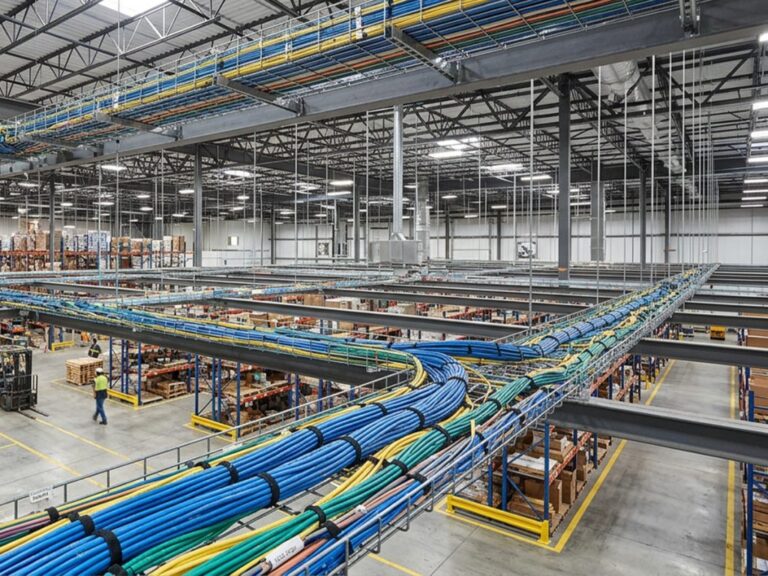
- Structured cabling design using Cat6 or Cat6a for network runs, with fiber backbone connecting distant zones — a lobby, an overflow room, or a detached fellowship hall where copper alone can’t reliably cover the distance.
- Dedicated AV racks and clearly planned conduit paths, sized with room for the next phase of growth rather than exactly what’s going in on day one.
- Separation of production, broadcast, and guest networks, so your stream and control systems aren’t fighting congregational or attendee Wi-Fi for bandwidth.
- Testing, labeling, and documentation for every single run — the difference between a volunteer fixing a dead input in two minutes and someone tracing an unlabeled cable through a ceiling for an hour while a service waits.
This is the full scope we handle for churches and venues across LA, from structured data wiring and network cabling to audio-video wiring and installation, and, when a campus needs it, fiber optic cabling connecting buildings or zones.
Planning an AV & Network Wiring Project for Your LA Church or Venue
If there’s one thing that determines cost and outcome more than anything else, it’s timing. Cable paths and conduit are dramatically easier — and cheaper — to install before walls close up than after, so the earlier this gets planned into your build or renovation, the better off you’ll be.
- Start with a site walk. Map every zone that needs audio, video, or network: sanctuary, stage, booth, lobby, nursery, overflow room, outdoor areas.
- Plan cable paths and conduit before drywall goes up, even for devices that won’t be installed until a later phase.
- Bring AV and electrical trades in early, so audio, video, and power runs are coordinated instead of competing for the same wall cavity later.
- Size the network for your busiest day, not your average one — think Christmas or Easter service, or a fully booked event night.
- Document everything. Future maintenance, upgrades, and troubleshooting shouldn’t have to start from zero.
Get Expert AV & Network Cabling for Your LA Church or Venue
Your AV system is only ever as good as the infrastructure sitting quietly behind the walls. With over 17 years spent designing and installing network cabling and AV systems across Los Angeles as a licensed, insured low-voltage contractor, we’ve learned exactly what it takes to build something that holds up — not just on installation day, but through years of Sundays, events, and the inevitable “can we add one more camera?” conversation.
If you’re planning a church or venue project and want it done right the first time, get in touch with our team or call — we’re happy to walk the space with you and figure out what it actually needs. We work with churches and event venues throughout the Los Angeles area.
FAQ
How much does AV installation cost for a church in Los Angeles?
It varies quite a bit based on square footage, number of zones, and whether it’s new construction or a retrofit. The good news is that infrastructure — cabling, conduit, network — is typically a smaller share of the total AV budget than the equipment itself, and it’s the part that determines how easily you can upgrade equipment down the road.
What’s the difference between AV wiring and network cabling?
AV wiring carries audio and video signal directly (speaker cable, SDI, HDBaseT), while network cabling — Cat6, Cat6a, fiber — carries data, including the traffic that modern AV systems, streaming encoders, and control systems increasingly depend on. A well-planned installation coordinates both together rather than treating them as two separate projects.
Does low-voltage AV and network work need a licensed contractor in California?
Communication and low-voltage systems work falls under the CSLB’s C-7 Low Voltage Systems classification. It’s worth confirming that whoever runs cable in your building holds the appropriate licence and carries insurance — particularly on a commercial or assembly-occupancy building like a church or event venue.
Can an existing church building be retrofitted for modern AV and streaming?
Absolutely, and we do this often. Older buildings usually need more thoughtful planning around cable pathways since conduit wasn’t part of the original construction, but retrofits are common and can typically be phased to fit your church’s budget and timeline.
Do event venues need separate networks for guests and production?
Yes — and this is one of the most common gaps we find in existing installations. Without that separation, guest Wi-Fi usage can directly eat into the bandwidth your livestream, camera feeds, or control systems need during an event.
How far in advance should AV wiring be planned during construction or renovation?
As early as possible — ideally before walls and ceilings close up. Adding conduit and cable capacity during construction costs a fraction of what it costs to retrofit into finished spaces later, and it saves everyone a headache down the line.